Terraform Provider
The Phase Terraform Provider allows you to securely manage and retrieve secrets directly from your Terraform configurations. This integration enables you to incorporate secure secret management into your infrastructure-as-code workflows.
Prerequisites
- Terraform 0.13.x or later
- Sign up for the Phase Console and create an App.
- Secrets are encrypted and decrypted by the provider itself (end-to-end encryption), so they work with any App. Managing environments, and granting service accounts access to an App, requires Server-side Encryption (SSE) on that App; Apps created by the provider use SSE.
Demo
A quick demo showing creating 100 secrets inside of the production environment across various paths via the terraform provider:
Preparation
-
Create a new Phase Service Account Token or a Personal Access Token (PAT). If you intend to retrieve values of personal secret overrides set in your account via the Phase Console or the Phase CLI, be sure to use a Personal Access Token (PAT).
-
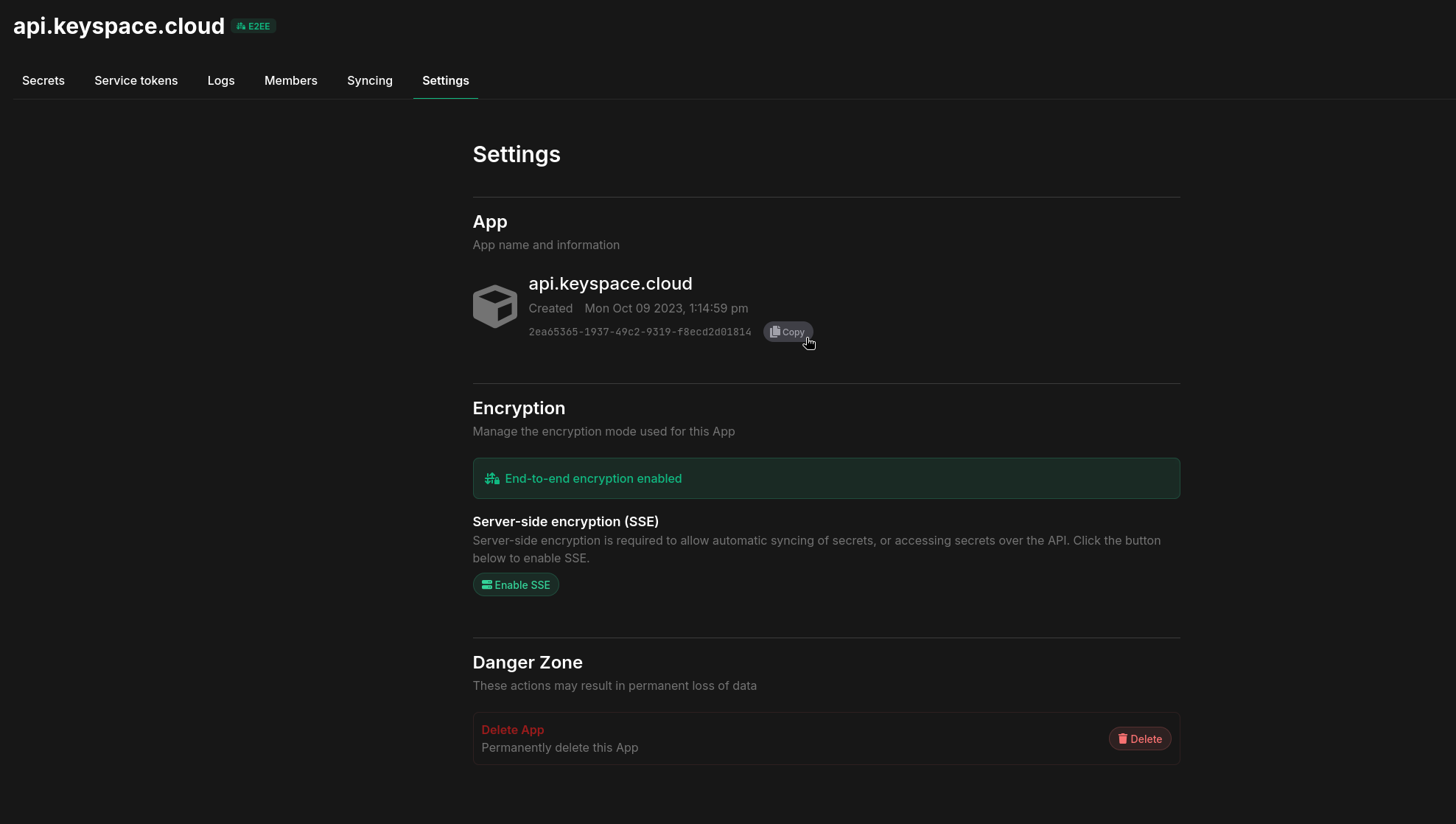
Fetch your Phase Application ID (AppID) by going to your application settings in the Phase Console, hovering over UUID under the App section and clicking the
Copybutton:
Step 1: Install the Provider
To use the Phase provider in your Terraform configuration, add the following Terraform block to your configuration:
terraform {
  required_providers {
    phase = {
      source  = "phasehq/phase"
      version = "0.3.0" // replace with latest version
    }
  }
}
You can get the latest version of Phase from the official Terraform Registry or GitHub releases.
Step 2: Configure the Provider
To configure the provider, you need to provide your Phase API credentials. We recommend using environment variables for sensitive information:
provider "phase" {
  phase_token = "pss_service:v2:..." # or "pss_user:v1:..." // A Phase Service Account Token or a Phase User Token (PAT)
  // Alternatively supply a PHASE_TOKEN environment variable
}
If you are using a self-hosted instance of Phase, you can specify the API host using the host argument in the provider configuration:
provider "phase" {
  host                 = "https://phase.example.io"
  skip_tls_verification = true # Optional, if your Phase instance is using a self-signed certificate, you can set this to true to skip TLS verification.
  phase_token          = "pss_service:v2:..." # or "pss_user:v1:..." // A Phase Service Account Token or a Phase User Token (PAT)
}
You can provide the phase_token at runtime through the interactive menu or as an environment variable using any of the following: PHASE_TOKEN, PHASE_SERVICE_TOKEN, PHASE_PAT_TOKEN.
Step 3: Using the Provider
Fetching Secrets
To fetch secrets from Phase, use the phase_secrets data source:
data "phase_secrets" "all" {
  env    = "development" // The environment to fetch secrets from.
  app_id = "your-app-id" // The ID of the Phase application to fetch secrets from.
  path   = "" // Use an empty string to fetch all secrets in the application.
}

output "all_secret_keys" {
  value     = data.phase_secrets.all.secrets
  sensitive = true
}
☝️ This will fetch all secrets stored inside your Phase application in the development environment.
Example:
terraform {
  required_providers {
    phase = {
      source = "phasehq/phase"
      version = "0.3.0"
    }
  }
}

provider "phase" {
  skip_tls_verification = true
  host = "https://phase.internal.acme.com"
}

data "phase_secrets" "all" {
  env    = "production"
  app_id = "907549ca-1430-4aa0-9998-290525741005"
  path   = ""
}

output "all_secret_keys" {
  value     = data.phase_secrets.all.secrets
  sensitive = true
}
Fetching Secrets from a Specific Path
To fetch all secrets under a specific path:
data "phase_secrets" "path_secrets" {
  env    = "production"
  app_id = "your-app-id"
  path   = "/backend"
}

output "backend_secret_keys" {
  value     = data.phase_secrets.path_secrets.secrets["JWT_SECRET"]
  sensitive = true
}
Example:
terraform {
  required_providers {
    phase = {
      source = "phasehq/phase"
      version = "0.3.0"
    }
  }
}

provider "phase" {
  skip_tls_verification = true
  host = "https://phase.internal.acme.com"
}

data "phase_secrets" "backend" {
  env    = "production"
  app_id = "907549ca-1430-4aa0-9998-290525741005"
  path   = "/backend"
}

output "jwt_secret" {
  value     = data.phase_secrets.backend.secrets["JWT_SECRET"]
  sensitive = true
}
☝️ This will fetch the JWT_SECRET secret from the /backend folder inside your Phase application in the production environment.
Fetching a Single Secret
To fetch a specific secret:
data "phase_secrets" "single" {
  env    = "development"
  app_id = "your-app-id"
}

output "database_url" {
  value     = data.phase_secrets.single.secrets["DATABASE_URL"]
  sensitive = true
}
☝️ This will fetch the value of the DATABASE_URL secret from your Phase application in the development environment.
Example:
terraform {
  required_providers {
    phase = {
      source = "phasehq/phase"
      version = "0.3.0"
    }
  }
}

provider "phase" {
  host = "https://phase.internal.acme.com"
}

data "phase_secrets" "single" {
  env    = "production"
  app_id = "907549ca-1430-4aa0-9998-290525741005"

}

output "database_url" {
  value     = data.phase_secrets.single.secrets["DATABASE_URL"]
  sensitive = true
}
Creating Secrets
resource "phase_secret" "example" {
  app_id  = "8b94fe5c-ea7d-4091-9087-e0e03089bd47"
  env     = "production"
  key     = "DATABASE_URL"
  path    = "/database/pgsql"
  comment = "AWS RDS PostgreSQL database creds"
  tags    = ["database", "RDS"]  // Tags are created automatically if they don't exist yet
  type    = "secret"             // Optional: secret (default), config or sealed
  value   = "postgres://$${USER}:$${PASSWORD}@$${HOST}:$${PORT}/$${DATABASE}"
}
Secret references such as ${USER} are stored verbatim and resolved when secrets are read through the phase_secrets data source. Escape them as $${USER} in HCL so Terraform does not interpolate them.
Example:
terraform {
  required_providers {
    phase = {
      source  = "phasehq/phase"
      version = "0.3.0"
    }
    random = {
      source  = "hashicorp/random"
      version = "3.6.0"
    }
  }
}

provider "phase" {
  host = "https://internal.phase.acme.com"
}

# Generate random values for secrets
resource "random_bytes" "secret_1" {
  length = 32
}

resource "random_bytes" "secret_2" {
  length = 64
}

resource "phase_secret" "terraform_secret_1" {
  app_id  = "8b94fe5c-ea7d-4091-9087-e0e03089bd47"
  env     = "development"
  key     = "TF_SECRET_1"
  value   = random_bytes.secret_1.hex
  path    = "/"
  comment = "Created by Terraform"
  tags    = ["database"]
}

resource "phase_secret" "terraform_secret_2" {
  app_id  = "8b94fe5c-ea7d-4091-9087-e0e03089bd47"
  env     = "production"
  key     = "TF_SECRET_2"
  value   = random_bytes.secret_2.hex
  path    = "/foo-bar"
  comment = "Created by Terraform"
}
Using Secrets in Resources
You can use the fetched secrets in your Terraform configurations like this:
resource "some_resource" "example" {
  database_url   = data.phase_secrets.all.secrets["DATABASE_URL"]
  api_key        = data.phase_secrets.all.secrets["API_KEY"]
  backend_config = data.phase_secrets.all.secrets["BACKEND_CONFIG"]
}
Managing Apps, Environments, Service Accounts and Invites
Besides secrets, the provider can provision the Phase resources around them. These resources use the Phase REST API with the same token, so the token's role must grant the corresponding permissions (for example the built-in Service role can create Apps but not delete them; an Owner or Admin Personal Access Token can do everything). Apps created by the provider have Server-side Encryption enabled.
Creating an App
resource "phase_app" "backend" {
  name        = "backend"
  description = "Managed by Terraform"
}

output "app_id" {
  value = phase_app.backend.id
}
☝️ This creates the App with the default Development, Staging and Production environments. On paid plans you can pass environments = ["dev", "qa", "prod"] to create custom environments instead (only applied at creation).
Secrets can reference the App directly, so a single terraform apply provisions the App and its secrets:
resource "phase_secret" "db_password" {
  app_id  = phase_app.backend.id
  env     = "production"
  key     = "DB_PASSWORD"
  value   = "hunter2-rotate-me"
  path    = "/database"
  tags    = ["database"]
  comment = "Managed by Terraform"
}
Environments
Custom environments require a paid plan. On any plan, existing environments can be imported and renamed:
resource "phase_environment" "qa" {
  app_id = phase_app.backend.id
  name   = "qa"
}

output "qa_environment" {
  value = {
    id       = phase_environment.qa.id
    env_type = phase_environment.qa.env_type # dev, staging, prod or custom
    index    = phase_environment.qa.index
  }
}
On the Free plan, creating a custom environment fails with Environment quota exceeded for this app's plan. Import a default environment instead with terraform import phase_environment.<name> "<app_id>:<environment_id>".
Service Accounts and Tokens
Roles are referenced by ID; use the phase_role data source to look them up by name. The access block grants the service account specific environments of an App, by environment name:
data "phase_role" "service" {
  name = "Service"
}

resource "phase_service_account" "deploy" {
  name    = "deploy"
  role_id = data.phase_role.service.id

  access {
    app_id       = phase_app.backend.id
    environments = ["Production"]
  }
}

# An extra token that expires after 30 days
resource "phase_service_account_token" "ci" {
  service_account_id = phase_service_account.deploy.id
  name               = "ci"
  expires_in         = 60 * 60 * 24 * 30
}

output "deploy_token" {
  value     = phase_service_account.deploy.token # the initial token, pss_service:v2:...
  sensitive = true
}
☝️ The service account is created with server-side key management and an initial token named Default (configurable with token_name). The full token string is only returned once by Phase; the provider exports it as the sensitive token attribute (and its REST form as bearer_token), which means it is stored in your Terraform state. phase_service_account_token creates additional tokens; they cannot be modified, so any change creates a new token, and a token deleted in the Console is re-created on the next apply.
The token works immediately with the REST API, the CLI, the SDKs and the Kubernetes operator. For example, using the Terraform-created service account against the App's Production environment:
export TOKEN=$(terraform output -raw deploy_token)

# REST API: use the third segment of the token as the bearer value
curl -H "Authorization: Bearer ServiceAccount $(echo $TOKEN | cut -d: -f3)" \
  "https://api.phase.dev/v1/secrets/?app_id=$(terraform output -raw app_id)&env=production"
[
  {"key": "DATABASE_URL", "value": "postgres://app:hunter2-rotate-me@db.internal:5432/app", "path": "/", "tags": [], "comment": "", "type": "secret", "version": 1},
  {"key": "DB_PASSWORD", "value": "hunter2-rotate-me", "path": "/database", "tags": ["database"], "comment": "Managed by Terraform", "type": "secret", "version": 1}
]
An environment that was not granted is refused with {"error": "Service account cannot access this environment"}. The same token with the CLI:
PHASE_SERVICE_TOKEN=$TOKEN phase secrets export --app-id $(terraform output -raw app_id) --env production --format dotenv
DATABASE_URL="postgres://app:hunter2-rotate-me@db.internal:5432/app"
The access block is declarative: Apps that are not listed lose access when the block is set. Only Apps with Server-side Encryption can be granted. Removing the block entirely leaves the current access untouched.
Inviting Members
data "phase_role" "developer" {
  name = "Developer"
}

resource "phase_invite" "alice" {
  email   = "alice@example.com"
  role_id = data.phase_role.developer.id
}

output "invite_expires_at" {
  value = phase_invite.alice.expires_at
}
☝️ Phase emails the invite link to the address. Invites expire after 14 days and cannot be assigned roles with global access. Once the invite is accepted the resource is kept in state; if it expires or is cancelled outside Terraform, it is re-created on the next terraform apply. App access for the new member is granted afterwards in the Console or via the Members API.
Complete Example
The following configuration was applied end to end against a Phase instance: terraform plan shows 6 to add, terraform apply reports Resources: 6 added, a second terraform plan reports No changes, and terraform destroy removes everything again.
terraform {
  required_providers {
    phase = {
      source  = "phasehq/phase"
      version = "0.3.0"
    }
  }
}

provider "phase" {
  # PHASE_TOKEN and PHASE_HOST are read from the environment
}

resource "phase_app" "backend" {
  name        = "backend"
  description = "Managed by Terraform"
}

resource "phase_secret" "db_password" {
  app_id  = phase_app.backend.id
  env     = "production"
  key     = "DB_PASSWORD"
  value   = "hunter2-rotate-me"
  path    = "/database"
  tags    = ["database"]
  comment = "Managed by Terraform"
}

# References are stored as written and resolved when secrets are read
resource "phase_secret" "db_url" {
  app_id = phase_app.backend.id
  env    = "production"
  key    = "DATABASE_URL"
  value  = "postgres://app:$${/database/DB_PASSWORD}@db.internal:5432/app"
}

data "phase_secrets" "production" {
  app_id     = phase_app.backend.id
  env        = "production"
  path       = "" # all paths
  depends_on = [phase_secret.db_password, phase_secret.db_url]
}

data "phase_role" "service" {
  name = "Service"
}

data "phase_role" "developer" {
  name = "Developer"
}

resource "phase_service_account" "deploy" {
  name    = "deploy"
  role_id = data.phase_role.service.id

  access {
    app_id       = phase_app.backend.id
    environments = ["Production"]
  }
}

resource "phase_service_account_token" "ci" {
  service_account_id = phase_service_account.deploy.id
  name               = "ci"
  expires_in         = 60 * 60 * 24 * 30
}

resource "phase_invite" "alice" {
  email   = "alice@example.com"
  role_id = data.phase_role.developer.id
}

output "app_id" {
  value = phase_app.backend.id
}

output "production_secrets" {
  value     = data.phase_secrets.production.secrets
  sensitive = true
}

output "deploy_token" {
  value     = phase_service_account.deploy.token
  sensitive = true
}
terraform output -json production_secrets
{
  "DATABASE_URL": "postgres://app:hunter2-rotate-me@db.internal:5432/app",
  "DB_PASSWORD": "hunter2-rotate-me"
}
☝️ DATABASE_URL is stored in Phase with the reference intact and comes back resolved from the data source.
See the provider documentation for every argument and attribute.
Step 4: Run terraform
Initialize Terraform in the root of your project. This will pull all dependencies and configurations:
terraform init
Run Terraform plan to retrieve secrets from Phase and preview the changes that will be made:
terraform plan
Execute your Terraform workflow:
terraform apply
Step 5: Destroy the resources
To destroy the resources created by the Terraform configuration, run the following command:
terraform destroy
Importing Existing Resources
Resources that already exist in Phase can be adopted into your Terraform state with terraform import:
terraform import phase_secret.<resource_name> "<app_id>:<env>:<path>:<key>"
terraform import phase_app.<resource_name> "<app_id>"
terraform import phase_environment.<resource_name> "<app_id>:<environment_id>"
terraform import phase_service_account.<resource_name> "<service_account_id>"
For example:
terraform import phase_secret.imported_secret "907549ca-1430-4aa0-9998-290525741005:production:/database/:DB_HOST"
terraform import phase_app.existing "907549ca-1430-4aa0-9998-290525741005"
☝️ After importing, terraform plan shows no changes when the configuration matches the imported resource. Token values of an imported service account cannot be recovered (Phase only returns them once), so token and bearer_token stay empty. App and environment IDs are shown in the Console, or returned by the Apps and Environments REST endpoints.
Secret Versions and Metadata
The provider automatically tracks secret versions and metadata:
resource "phase_secret" "database_url" {
  env    = "production"
  app_id = "your-app-id"
  key    = "DATABASE_URL"
  value  = "postgres://user:password@localhost:5432/db"
  tags   = ["database", "credentials"]
}

output "secret_version" {
  value = phase_secret.database_url.version
}

output "secret_created_at" {
  value = phase_secret.database_url.created_at
}
Personal Secret Overrides
Personal Secret Overrides allow individual users to temporarily override a secret's value for their own use, without affecting the value for other users or systems. Important points to note:
-
User Token Requirement: Personal Secret Overrides require authentication with a Phase User Token (Personal Access Token or PAT). Service tokens do not support this feature.
-
Activation: An
overrideblock on aphase_secretcreates the override active for the authenticated user (or updates its value). Deactivating an existing override is done through the Phase Console or the Phase CLI. -
Behavior: When active, the Terraform provider automatically uses the overridden value instead of the main secret value when fetching secrets.
-
Visibility: Personal Secret Overrides are only visible and applicable to the user who created them.
Best Practices
- Use variables or environment variables for the Phase token to keep it out of your Terraform configurations.
- Utilize Terraform's
sensitiveargument when outputting or using secret values to prevent accidental exposure. - Be cautious when using
terraform outputcommands, as these may display sensitive information. - Store the
phase_service_account.tokenandphase_service_account_token.tokenoutputs securely: like any Terraform-managed credential they are kept in the state file.